# Staying up-to-date with HDX

Humanitarian data changes frequently. This section explains how to stay informed about new and updated data on HDX. HDX offers several features to help you stay current:

* **HDX Notifications** - Subscribe to specific datasets, locations, organizations, or crises to receive email alerts when data is added or updated. You can find step-by-step instructions on signing up to Notifications on these pages.
* **HDX Signals** - A product that monitors key datasets and generates automated emails when significant, negative changes are detected. You can find out more about Signals and sign up for alerts [here](https://data.humdata.org/signals).
* **Activity streams** - View recent changes on organization and location pages on the Activity stream section of the dataset page.
* **Data freshness indicators** - Visual indicators on dataset pages show whether data is being updated on schedule.

## **HDX Notifications**

### Types of HDX Notification <a href="#types-of-hdx-notification" id="types-of-hdx-notification"></a>

There are two types of notifications available on HDX:&#x20;

**1. Datasets**

Dataset notifications inform users about changes to resources within a dataset, including when a resource has been added, updated or removed, or when there have been changes to the structure of tabular data (e.g., columns or headers change).

**2. Locations, crises and organizations**

Notifications for location, crisis and organization pages inform users when a new dataset has been added to the page by a data contributor.

### Subscribe to get HDX Notifications <a href="#subscribe-to-get-hdx-notifications" id="subscribe-to-get-hdx-notifications"></a>

{% stepper %}
{% step %}

#### Click the ‘Get notified’ button on the relevant page

<div data-with-frame="true"><figure><img src="/files/Kbx2RqA9iugI6KuNlKf1" alt=""><figcaption><p>Get Notified Button</p></figcaption></figure></div>

From any dataset, location, crisis or organization page, you can subscribe by clicking the ‘Get notified’ button at the top of the page, below the title.
{% endstep %}

{% step %}

#### Enter your email address or log in

If you don’t have an HDX account, enter your email address and follow the prompts to verify your email.&#x20;

If you have an HDX account, log into the account using the associated email address.
{% endstep %}

{% step %}

#### You are subscribed!

You have successfully subscribed to notifications for this page.
{% endstep %}
{% endstepper %}

### Receive HDX Notifications <a href="#receive-hdx-notifications" id="receive-hdx-notifications"></a>

Notifications are sent shortly after data contributors add or update data on HDX.

### Unsubscribe from HDX Notifications

There are three ways to unsubscribe from notifications.

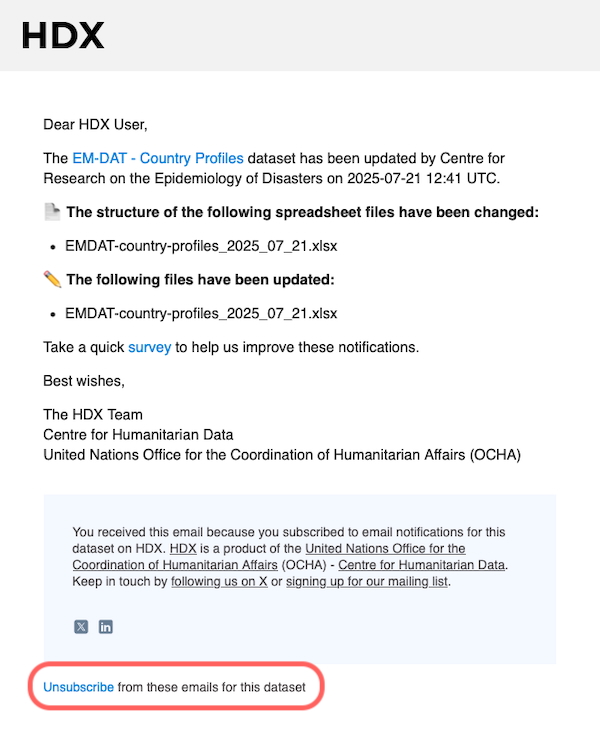
#### **1 - Unsubscribe from a recent email**

Click the unsubscribe link on a recent email.

<div align="center"><figure><img src="/files/SU5YxEBEHczrQDQMCN2U" alt="" width="300"><figcaption><p>Email unsubscribe</p></figcaption></figure></div>

#### **2 - Unsubscribe via the page**

{% stepper %}
{% step %}
**Go to the dataset, location, crisis or organization page you are subscribed to**

<div align="left"><figure><img src="/files/TXrmGMgdKBdFg9Vtpq7I" alt=""><figcaption><p>Organization page unsubscribe button</p></figcaption></figure></div>
{% endstep %}

{% step %}
**Click the ‘Unsubscribe’ button**

Click the ‘Unsubscribe’ button on the page and confirm you want to unsubscribe.
{% endstep %}
{% endstepper %}

#### 3 - Unsubscribe from the Notifications Hub (if you have an HDX account)

{% stepper %}
{% step %}
**Log into your HDX account**

Log in to your HDX account using the menu at the top of every page.
{% endstep %}

{% step %}
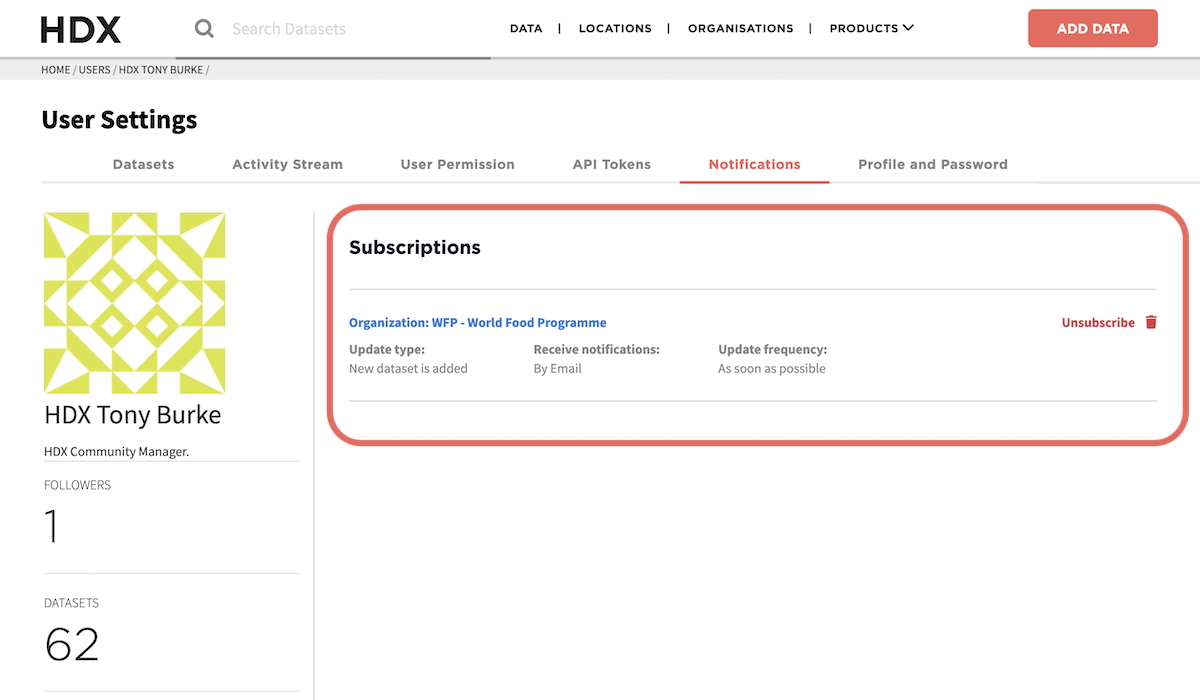
**Go to the Notifications Hub**

Once logged in, access the Notifications Hub under User Settings by clicking on your name at the top right of the page.

<div align="left"><figure><img src="/files/0LkXG1PaBLVuoW9Zr0KB" alt=""><figcaption><p>Notifications Hub tab under User Settings</p></figcaption></figure></div>
{% endstep %}

{% step %}
**Find the notification that you want to unsubscribe from**

All of your notification subscriptions will be listed in the Notifications Hub.

<div align="left"><figure><img src="/files/N6hX72LHCMAvDR6gzLxq" alt=""><figcaption><p>Notifications Hub list</p></figcaption></figure></div>
{% endstep %}

{% step %}
**Click the ‘Unsubscribe’ button**

To unsubscribe from a notification, click the button next to the subscription.
{% endstep %}
{% endstepper %}

***

### HDX Notifications FAQs

**Q: Do I need an HDX account to get notified?**

No. You can sign up for notifications with your email address. However, we recommend keeping your browser’s cookies enabled to make it easier to unsubscribe. If you want to manage your subscriptions through the Notifications Hub, you will need an HDX account.

**Q. Are notifications available for all datasets on HDX?**

No. Notifications are only available for regularly updated, public datasets.

We do not currently offer notifications for the following datasets:

* Datasets that are not expected to update (‘Never’ under ‘Expected Update Frequency’)
* Private datasets
* Archived datasets
* HDX Connect datasets

**Q. What’s the difference between a dataset and a resource?**

A dataset is a collection of one or more resources.

* A dataset includes a title, description, tags, and metadata.
* A resource is an individual file within that dataset, such as a spreadsheet or shapefile.

**Q. What changes prompt a notification to be sent?**

Notifications will be sent when certain changes occur to a dataset resource or page. The table below summarises the changes that will prompt an email notification to be sent:

<table data-header-hidden data-full-width="false"><thead><tr><th width="368"></th><th width="188.5" align="center"></th><th align="center"></th></tr></thead><tbody><tr><td><strong>Type of Change</strong></td><td align="center"><strong>Dataset</strong> <strong>Notification</strong></td><td align="center"><strong>Location, Crisis or Organization page Notification</strong></td></tr><tr><td><strong>Dataset added to page</strong></td><td align="center">n/a</td><td align="center">✅</td></tr><tr><td><strong>Dataset removed from page</strong></td><td align="center">n/a</td><td align="center">❌</td></tr><tr><td><strong>Resource (file) added or removed</strong></td><td align="center">✅</td><td align="center">❌</td></tr><tr><td><strong>Resource updated (e.g. file replaced)</strong></td><td align="center">✅</td><td align="center">❌</td></tr><tr><td><strong>Structure of resource has changed</strong></td><td align="center">✅</td><td align="center">❌</td></tr><tr><td><strong>Metadata or text description changed only</strong></td><td align="center">❌</td><td align="center">❌</td></tr></tbody></table>

**Q. How soon after a change will I get a notification?**

Notifications are sent three hours after a change is first detected. This delay gives us time to group related changes into a single email notification, and gives the data contributor time to complete their updates.&#x20;

**Q: I subscribed but I’m not getting notifications. What should I do?**

Check your spam or junk folder. If you signed up using your email (without logging into an HDX account), make sure you have clicked on the verification link we sent.

Alternatively, you might not have received a notification because there have not been any changes since you subscribed. You can check this by visiting the relevant page on HDX.

If the problem persists, contact <hdx@un.org> for support.

**Q: I want to unsubscribe from a notification, but I don’t see the ‘Unsubscribe’ button on the page. How can I unsubscribe?**

If you signed up using your email (without logging into an HDX account), and your browser has cleared the relevant cookies, the ‘unsubscribe’ button may not appear.

If this is the case, unsubscribe via the ‘Unsubscribe’ link in any of the email notifications you have received.

**Q. How reliable are notifications?**

We aim to ensure notifications are timely and relevant, but there are some limitations to be aware of. We can only notify you about changes that are made directly on HDX. We cannot guarantee that a dataset published on HDX is the most recent version available.


---

# Agent Instructions: Querying This Documentation

If you need additional information that is not directly available in this page, you can query the documentation dynamically by asking a question.

Perform an HTTP GET request on the current page URL with the `ask` query parameter:

```
GET https://docs.humdata.org/find/find-data/staying-up-to-date-with-hdx.md?ask=<question>
```

The question should be specific, self-contained, and written in natural language.
The response will contain a direct answer to the question and relevant excerpts and sources from the documentation.

Use this mechanism when the answer is not explicitly present in the current page, you need clarification or additional context, or you want to retrieve related documentation sections.